



© 2026 Steeple
We're updating the Events app to make it easier to use on a daily basis. Nothing will be lost: your events, your attendance records, birthdays, and tenure will all remain intact.
🆕 What's New
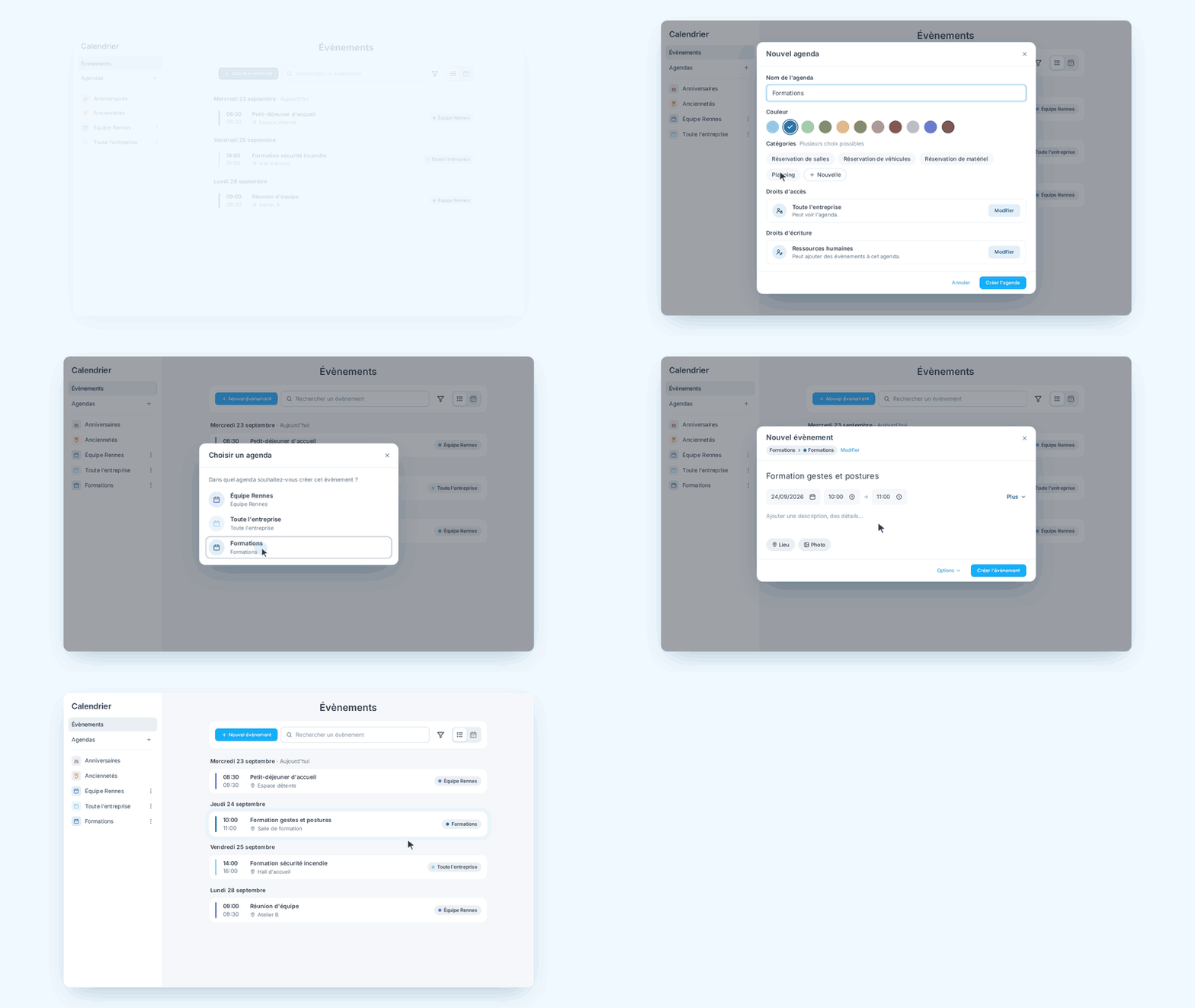
"Events" is now called "Calendar" and can be accessed from the Steeple main menu.
Gone is the single list: events are now organized into calendars (e.g., “Salle Loire,” “CSE Meetings”), sorted by category in the sidebar. Each calendar has its own color and its own access and editing permissions, which determine who can view its events and who can add them. Birthdays and work anniversaries also have their own dedicated calendar at the top of the sidebar.
"List" view or "Calendar" view (week, month, year). Users can choose the view that works best for them, and their preference is saved from one visit to the next. Past events are no longer isolated on a separate page; they remain accessible simply by scrolling up through the list.
A recurring event (weekly meeting, monthly office hours, etc.) does not need to be rescheduled. Simply set a frequency (daily, weekly, monthly, yearly) and an end date.
You can still respond to an event ("I'm attending," "Maybe," "Not attending") from the list, the calendar overview, or the event page, as long as the event hasn't passed.
ℹ️ This update also includes a simplified event creation process, with the option to automatically create a group discussion or share the event on the news feed.